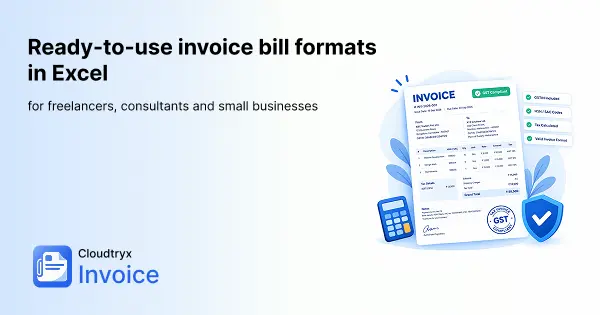
Ready-to-use invoice bill formats in Excel for freelancers, consultants and small businesses
Are you looking for an invoice bill format in Excel that is GST-compliant and ready to use? This guide covers what every GST tax invoice must include, the exact formulas for CGST, SGST and IGST, and how to print it on A4. We will help you create invoices that will never get rejected at any step. You can also download our free template or make an invoice online for free with Cloudtryx Invoice.
Key takeaways
- GST compliance is non-negotiable: Every registered business when creating invoices should include supplier GSTIN, HSN/SAC codes, place of supply, and separate CGST/SGST or IGST columns on each invoice.
- One supply-type selector cell: Placing “Intra-state” or “Inter-state” in a single cell lets all tax formulas switch automatically between CGST/SGST and IGST.
- Financial-year invoice numbering: Use a consistent format for numbering invoices such as INV/2026-27/0042 so records are traceable during GST filing and audits.
- Protect your formulas: Lock calculated cells and leave data-entry fields editable so the template cannot be broken accidentally.
- PDF beats xlsx for delivery: Always export to PDF before sending; it locks the layout and prevents accidental edits by the recipient.
What must a GST-compliant invoice bill format in Excel actually include?
If you are creating a tax invoice in excel, you need to know that you are creating a legal document, and not only a payment request. Under Rule 46 of the CGST Rules, every tax invoice issued by a registered business must carry specific particulars. Hence, we recommend you to build your excel templates in such a way from the start that the invoices don’t get rejected. If you are unsure about creating this legal document the right way, use our online invoice free template. Our templates are free to download and use to make sure that your invoices gets approved and your CA also doesn’t flag missing information during a return filing.
Let us know what all details are mandatory while issuing a tax invoice.
Supplier and buyer details every invoice needs
The invoice must include the supplier’s legal name, registered address, and GSTIN clearly at the top. For the recipient, a registered buyer’s GSTIN is mandatory.
Invoice number, date, and payment terms layout
Place the invoice number, invoice date, payment terms, and due date together in a clearly labelled block at the top-right. A format like INV/2026-27/0042 works well for Indian businesses because the financial-year prefix ties the invoice directly to the correct filing period. This will also help you know to which year the invoice belongs. It also prevents causing duplicate references.
For the due date, use the Excel formula. For example, due date=H5+H6, where H5 holds the invoice date and H6 holds the number of credit days. Format the result as dd-mmm-yyyy and the due date populates itself automatically every time you update the invoice date.
HSN/SAC codes, place of supply, and reverse-charge field
Goods carry an HSN code and services carry a SAC code. The number of digits you must show depends on your annual turnover. As per the notification currently in force by the government, businesses up to ₹5 crore report 4 digits on B2B invoices and those above ₹5 crore report 6 digits. Always confirm the latest requirement on the GST portal. Along with this, show the place of supply (state name and code) and a “Reverse Charge: Yes/No” field.
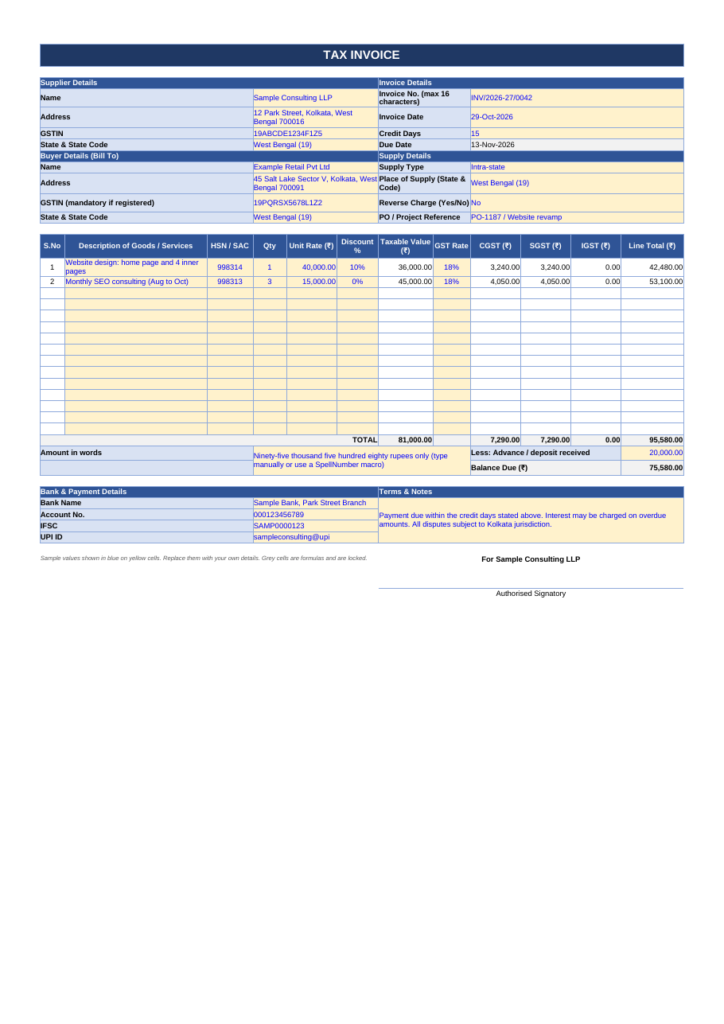
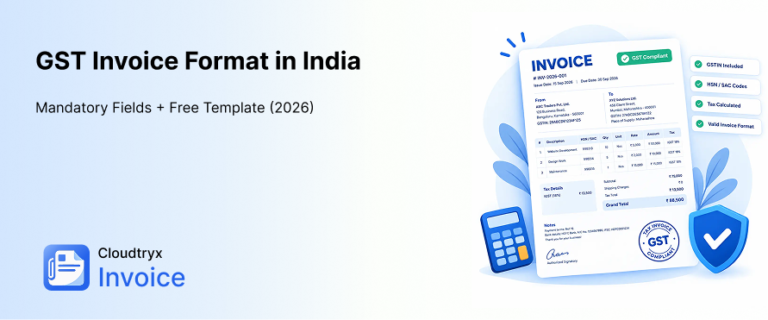
A Sample GST Invoice
Which invoice bill format in Excel suits your business type?
A generic xlsx file downloaded from a random source rarely fits all business types, and such templates often need a lot of modification. The fields a retailer needs differ meaningfully from those a consultant or a freelancer requires. However, invoice templates from Cloudtryx Invoice are built keeping different business needs in mind, and with our templates you spend less time restructuring rows and more time billing.
Service provider and consultant invoice template
A service-based invoice format in Excel needs a SAC code column alongside the service description, rows that support both hourly and fixed-rate billing, a section for reimbursable expenses, and a notes or milestone field for project-based engagements. This template structure works equally well for all types of service providers and consultants. IT consultants, marketing agencies, legal professionals, and any professional services firm that invoices for time or defined deliverables rather than physical goods.
Freelancer invoice template for project billing
Invoices for freelancers when made in excel should have a few distinctive requirements: a project name field, a clear deliverable description column, bank account and UPI details in a dedicated payment block, and a simple row to track any advance or deposit already received. The GST treatment also depends on registration status. A freelancer registered under regular GST must include CGST/SGST or IGST columns with full rate breakdowns, while someone under the composition scheme or below the registration threshold uses a simplified format without any tax related fields.
H3: Composition scheme and unregistered freelancers: Bill of Supply
Not every freelancer issues a tax invoice. A business registered under the composition scheme issues a Bill of Supply and cannot collect GST from the customer. A freelancer below the registration threshold who is not registered also cannot charge GST, so a simple bill without tax columns is enough. Only regular-GST registrants issue a tax invoice with CGST/SGST or IGST.
H3: When an Excel invoice doesn’t work: e-invoicing
Businesses whose aggregate annual turnover crosses the notified limit (₹5 crore at the time of writing; check the e-invoice portal for the current figure) must generate an e-invoice with an IRN and QR code through the government portal. An Excel template alone cannot do this, so if you are near the limit, plan to move to invoicing software as soon as you can.
How do you build the GST formulas for CGST, SGST, and IGST in Excel?
At the time of tax calculation, and amounts for CGST, SGST and IGST, most self made templates go wrong. The formulas are not complex, but the logic must be set up correctly so that switching between intra-state and inter-state supplies should not require manually changing every tax cell.
Setting up the item table and supply-type selector
Use this column layout for your item table, with the first item row starting at row 12: Quantity in column C, Unit Rate in D, Discount in E, Taxable Value in F, GST Rate in G, CGST in H, SGST in I, IGST in J, and Line Total in K. Place a dropdown in cell B6 with two options: “Intra-state” and “Inter-state.” Every tax formula in the table references this single cell, so changing the supply type updates every line automatically without touching individual cells.
Line-item formulas for taxable value and tax split
Assume your items start in row 12 and the supply type is in B6. Enter these formulas in row 12 and copy them down to row 30:
| Column | Formula |
| F: Taxable Value | =IF($C12=””,””,ROUND(C12*D12*(1-E12),2)) |
| H: CGST | =IF(C12=””,””,IF(B$6=”Intra-state”,ROUND(F12*G12/2,2),0)) |
| I: SGST | =IF(C12=””,””,IF(B$6=”Intra-state”,ROUND(F12*G12/2,2),0)) |
| J: IGST | =IF(C12=””,””,IF(B$6=”Inter-state”,ROUND(F12*G12,2),0)) |
| K: Line Total | =IF($C12=””,””,F12+H12+I12+J12) |
Enter the discount in column E and the GST rate in column G as percentages (10%, 18%), not whole numbers. The IF($C12=””,””,…) wrapper keeps empty rows blank, so you can leave unused rows without errors. To create the dropdown in B6, go to Data → Data Validation → Allow: List, and enter Intra-state,Inter-state.
Now let us understand this with an example: 10 units at ₹1,000 with a 10% discount and 18% GST gives a taxable value of ₹9,000. For an intra-state supply, CGST and SGST are ₹810 each, and the line total is ₹10,620. For an inter-state supply, IGST is ₹1,620 and CGST and SGST are 0.
Grand total, total in words, and invoice sum rows
If your item rows run from 12 to 30, place these totals in row 31: =SUM(F12:F30) for total taxable value, =SUM(H12:H30) for total CGST, =SUM(I12:I30) for total SGST, =SUM(J12:J30) for total IGST, and =ROUND(SUM(K12:K30),2) for the grand total. A total in words is not built into Excel. The common solution is a SpellNumber macro, which requires you to save the file as .xlsm (macro-enabled), not .xlsx. Most standard macros use the western system (million, billion), so use or edit a version that supports the Indian system (lakh, crore).
Printing your invoice on A4 and exporting it as a PDF
Even after you build your GST invoice perfectly on excel, it will fail professionally if the print is not right. The columns should not cut off or split across two pages. The page setup step takes two minutes and prevents that entirely.
A4 page setup: print area, margins, and scaling
Select only the invoice cells, then go to Page Layout, choose Print Area, and set the print area. Set the paper size to A4, orientation to Portrait, and margins to Narrow. Under Page Setup, set the scaling to Fit to 1 page wide with automatic height: this keeps all columns together on a single width while allowing a longer invoice to continue onto a second page naturally rather than forcing the text so small it becomes unreadable. Confirm that the printer driver’s paper setting also shows A4; a mismatch between Excel’s setting and the driver’s setting is the most common cause of incorrectly scaled printouts.
Exporting to PDF for professional delivery
Use File → Save As → PDF, or go to File → Print → Microsoft Print to PDF. Setting the print area correctly before exporting is the single most important step: without a defined print area, Excel may include blank pages from unused formatted cells or cut off the rightmost columns entirely. A PDF is preferable to sending the invoice format xlsx file for three reasons: it locks the layout so nothing shifts on the recipient’s screen, it prevents accidental edits by the client or their accounts team, and it is widely accepted by accounting systems and client payment workflows.
When your Excel invoice template is not enough?
Excel templates work well when you are billing limited clients. You must have gone through the GST calculations, and are already overwhelmed? Think of it when you do the same thing for multiple clients every month? As the business grows, the manual steps add up: open the template, update the date, change the invoice number, fill in the client details, check the formulas, export to PDF, send the email, follow up on overdue payments, repeat. At a certain point, the template is no longer saving time rather it is piling up more work on your plate.
Moving from a spreadsheet to an invoicing software
A common concern from businesses considering a switch is that they do not want to lose their historical invoice records or rebuild everything from scratch. You should choose a software where the team can assist you with migration of your previous records so that you don’t lose any data. Cloudtryx Invoice offers migration options for your existing data.
How to protect your Excel invoice template
Protecting the sheet stops you or anyone from your team overwriting formulas by accident.
- Press Ctrl+A, right-click, choose Format Cells → Protection, and untick Locked. This unlocks every cell.
- Select only the formula cells (columns F to K in the item rows, the totals row and the due date) and tick Locked.
- Go to Review → Protect Sheet, set a password if you want one, and make sure “Select unlocked cells” is allowed.
- Unlocked cells (client details, quantity, rate, discount, GST rate, supply type) stay editable, while the formulas stay locked.
Before making these adjustments ensure to keep an unprotected backup copy, because if you forget the password the document cannot be easily recovered.
From spreadsheet to managed invoicing system: choosing the right invoice bill format in Excel
You have now covered the full path: choosing a GST-compliant invoice bill format in Excel, building CGST and SGST formulas, and exporting a print-ready A4 PDF. The steps covered here apply to the type of template you are using for invoice creation: whether you are using a service provider template, a sample invoice for freelancers in Excel, or a retail invoice template in Excel with multi-rate GST.
When recurring invoices, client reminders, and financial reports start taking more time than the work itself, the Cloudtryx Invoice dashboard gives you all of that in one place without touching a single spreadsheet. Make a tax compliant invoice online for free with our free plan, and know how easy invoicing can be, without you going through the headache of managing formulas manually. Get in touch with our team to see how it fits your current billing workflow.
Frequently Asked Questions
Including registered buyer’s GSTIN is mandatory on every invoice issued to a registered buyer. If the same is missing, there is a risk that your client’s accounts team rejects the invoice and the invoice creates problems during return filing and reconciliation.
Yes, you must calculate GST at the line-item level so a single invoice can contain multiple rates correctly. In the excel template make sure that the columns, rows and formulas are fed correctly to avoid errors.
Use a financial-year invoice numbering format such as INV/2026-27/0042 so the prefix ties an invoice to the correct filing period. It eases out the invoice sorting process, and you get all invoices of one year at once, without having to open each and see the dates.